ISO 15118 EV Simulator · UCAN Studio add-on
Test your charging station controller against a simulated ISO 15118 electric vehicle.
The ISO 15118 EV Simulator provides the vehicle side of the session for ISO 15118-2, ISO 15118-20 and DIN SPEC 70121, including SLAC, TLS and Plug & Charge. Configure the vehicle you need, connect your controller and run complete charging sessions on your own bench.
- ISO 15118-2 · -20
- DIN SPEC 70121
- SLAC · HomePlug GP
- TLS 1.2 / 1.3
- Plug & Charge
- AC · DC · bidirectional
- Whitebeet carrier board
- Python · SDK · CLI
Why simulate the vehicle
Every vehicle configuration your controller has to support, available on your bench.
A charging station controller has to work with vehicles that differ in protocol version, requested services, authorization method and TLS version. Test vehicles cover a few of these combinations, and they are not available every day. The simulator provides each combination on demand, so controller development and regression testing do not depend on vehicle availability.
The diagram shows the stages of a session, from the control-pilot transition to SessionStop. The simulator runs the vehicle side of every stage and shows the progress in the dashboard.
ISO 15118 session: IEC 61851 → SLAC → SDP → TLS → SupportedAppProtocol → V2G messages
Connecting the controller
One vehicle simulation for software, hardware and closed-loop setups.
The same simulation is used throughout the project, from early software to the finished controller.
Software in the loop
Run your controller software on the PC and connect it to the simulator over a virtual Ethernet link. No hardware is required, so testing can start before the controller hardware is available.
Hardware in the loop
Connect the controller over powerline communication through a Whitebeet carrier board, including the control pilot. The controller uses the same physical link as with a vehicle.
Vehicle configuration
Configure the vehicle your controller has to handle.
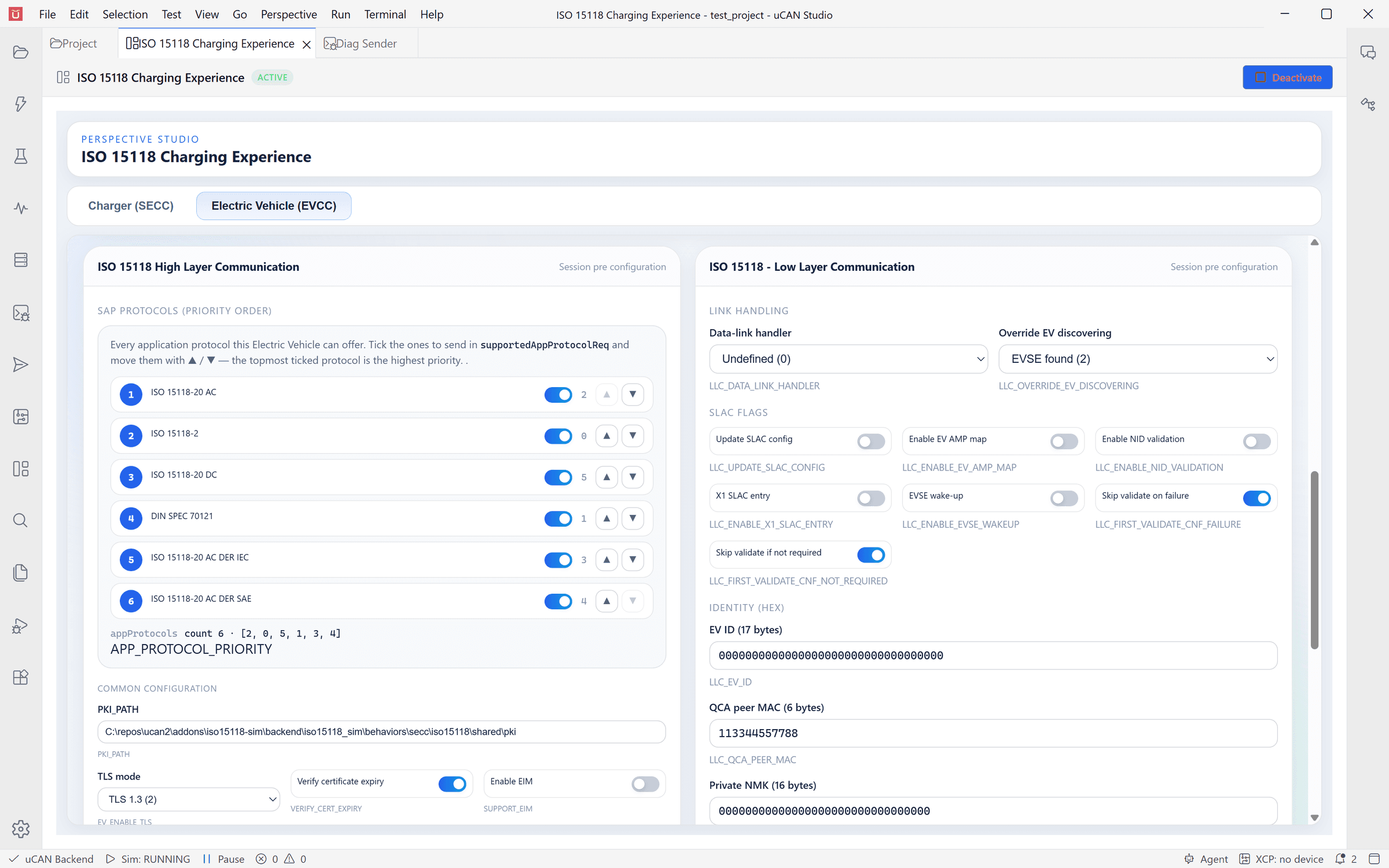
The behaviour of the vehicle is set in the dashboard, from the offered protocols to the details of SLAC matching.
Offered protocols and their priority
Select the protocols the vehicle offers in SupportedAppProtocol and their order: ISO 15118-20 for AC and DC, ISO 15118-2 and DIN SPEC 70121.
Charging services
For ISO 15118-20, select the AC and DC services the vehicle requests, including bidirectional power transfer, and scheduled or dynamic control. For ISO 15118-2, select the energy transfer mode.
External payment and Plug & Charge
Enable external identification or Plug & Charge with a contract certificate. Certificate installation and certificate update can be requested as part of the session.
TLS and certificates
Run sessions with TLS 1.3, with TLS 1.2 or without TLS, with optional verification of the certificate validity period. The vehicle uses the PKI you provide.
SLAC matching
Set the parameters of the matching process: EV ID, run ID, network key and network ID, amplitude map exchange, validation handling and the reaction to link errors.
Session control
Start session starts the communication of the vehicle. Reset Session drops and restores the data link, so the next session starts without restarting the simulation.
Workflow
Configure the vehicle, run the session and analyse the result.
Configuration
Configure the vehicle before the session
The dashboard contains the settings of the vehicle for high-level communication and for SLAC. Protocols and services are ticked and ordered by priority, and the resulting list is shown as it will be sent. The settings apply at the next simulation start.
- Separate settings for ISO 15118-2 with DIN SPEC 70121 and for ISO 15118-20
- Every setting is an environment variable and can also be set from a test or the command line
- The dashboard is HTML and is imported into your project as an editable file
Session progress
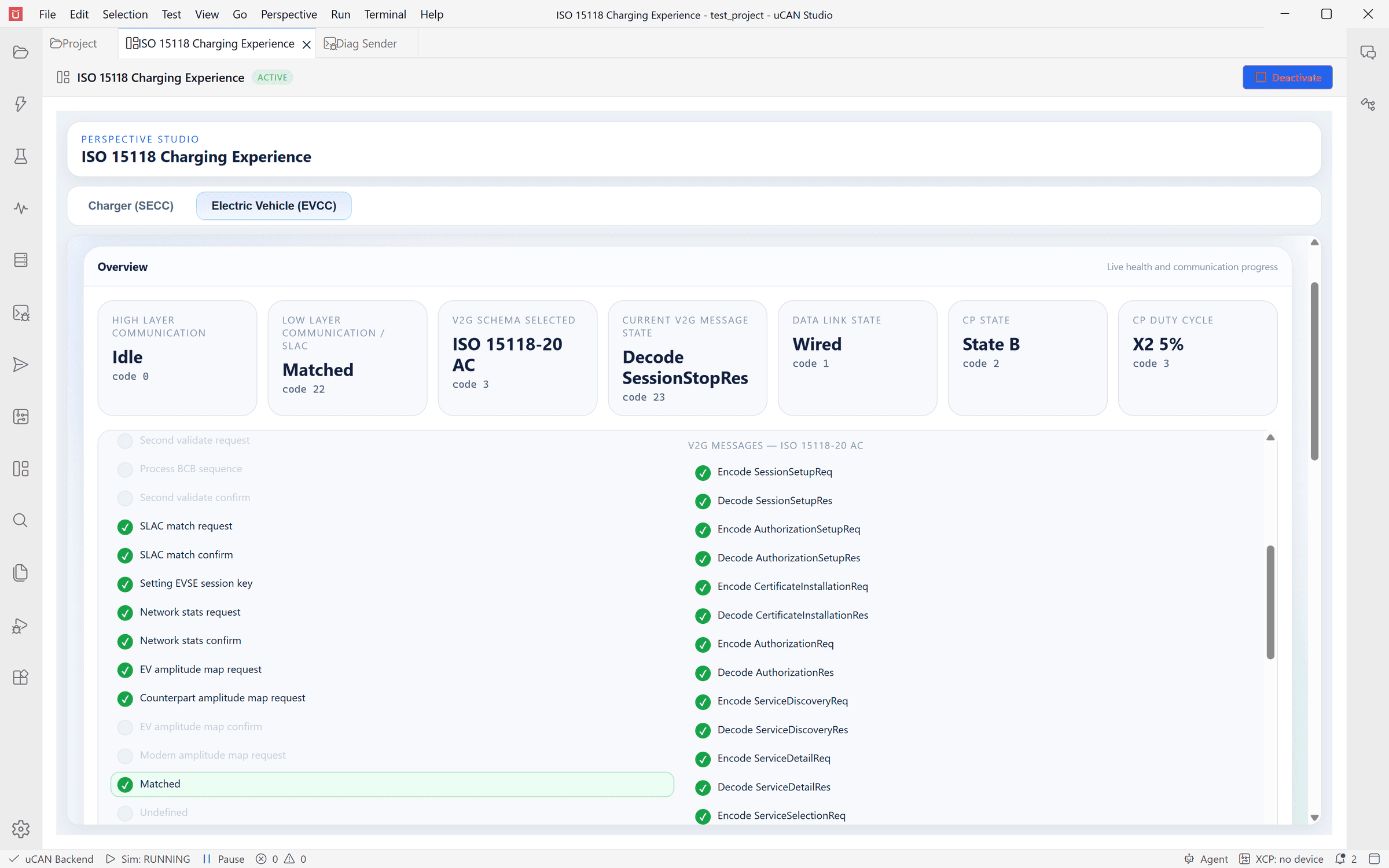
Follow the session step by step
The overview shows the state of the vehicle on every layer: SLAC matching, the data link, the control pilot state and duty cycle, the selected protocol and the current V2G message. A checklist marks each communication step as the session passes it, from the first SLAC message to SessionStop. When a session stops, the checklist shows the step at which it stopped.
- Low-layer and high-layer communication are shown separately
- ISO 15118-20 schedule renegotiation and metering confirmation have their own progress
- All states are available to tests and can be plotted over time
Closed loop
Complete sessions with the ISO 15118 Charger Simulator
With both simulators in one project, the Charging Experience dashboard shows the charger and the vehicle side by side and runs complete sessions between them without hardware. Both sides use the same certificate store. This setup is suited for demonstrations and training, and for preparing tests before the controller is available.
ISO 15118 Charger Simulator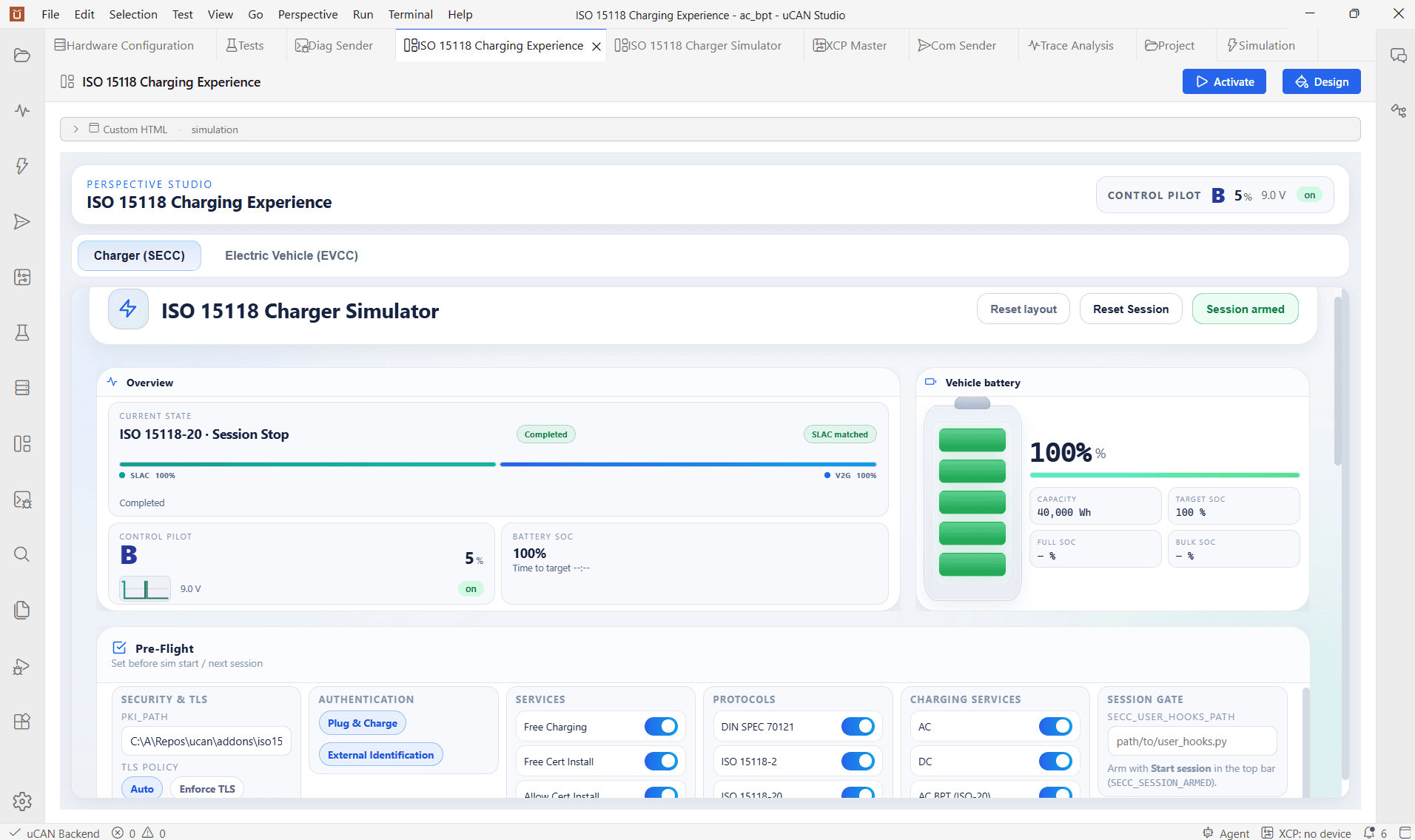
Trace
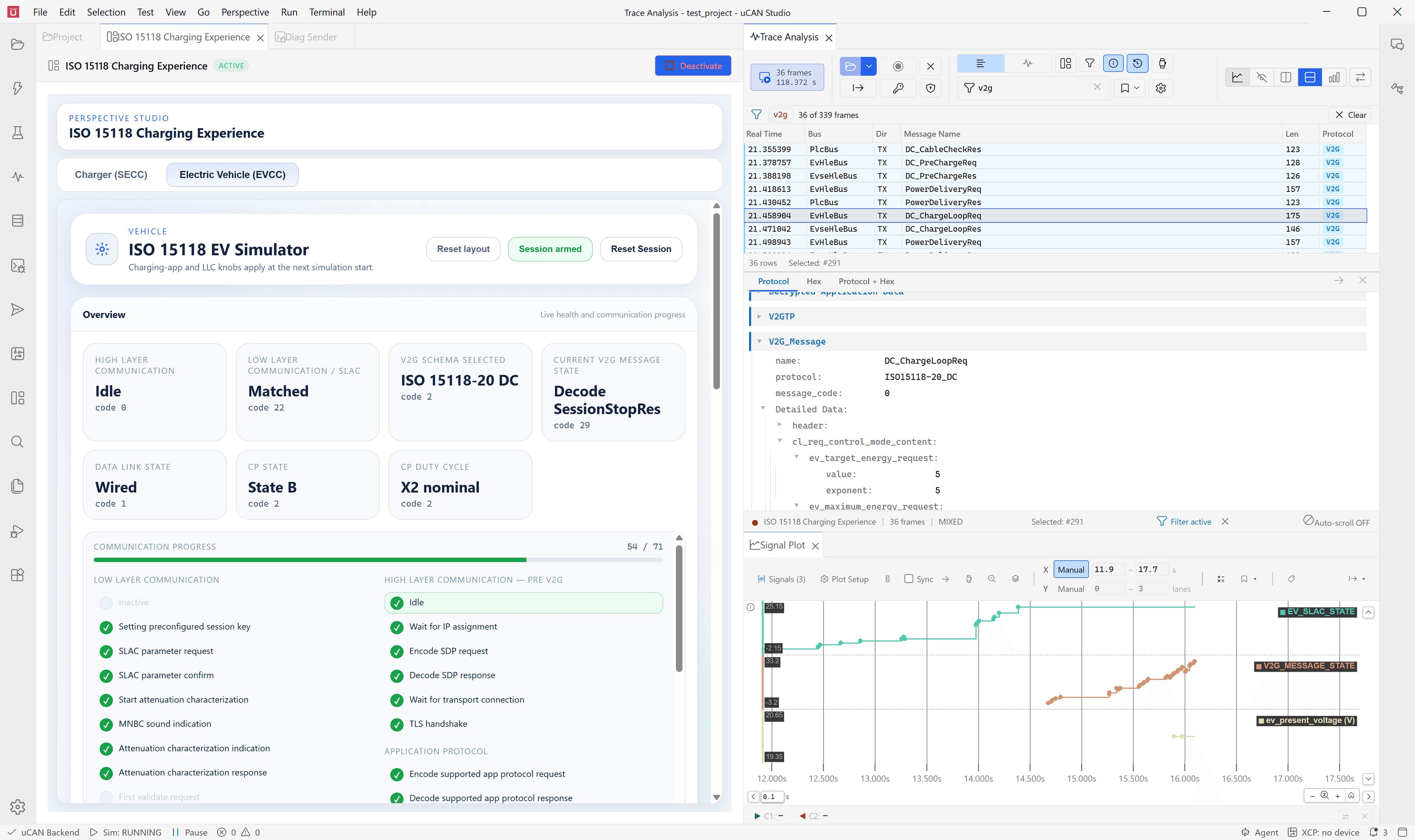
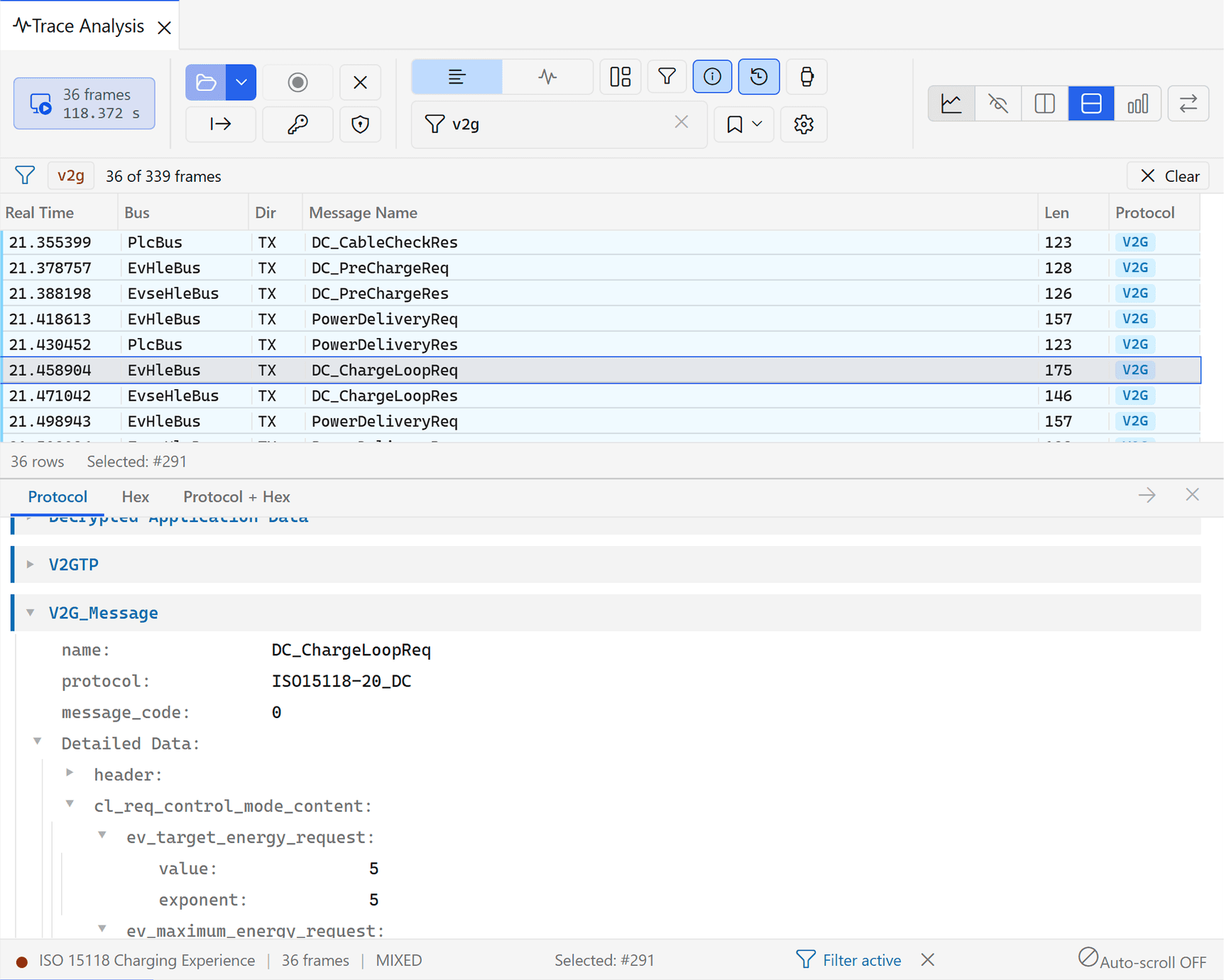
Every V2G message decoded field by field
The session is captured on every layer: SLAC, SDP, TLS and V2GTP/EXI. Each V2G message is decoded into the fields defined by the standard, so the request of the vehicle and the response of the controller can be compared directly in the trace.
- Filter the trace by protocol or message
- Export to PCAPNG, CSV, MDF4 and ASC
Signals
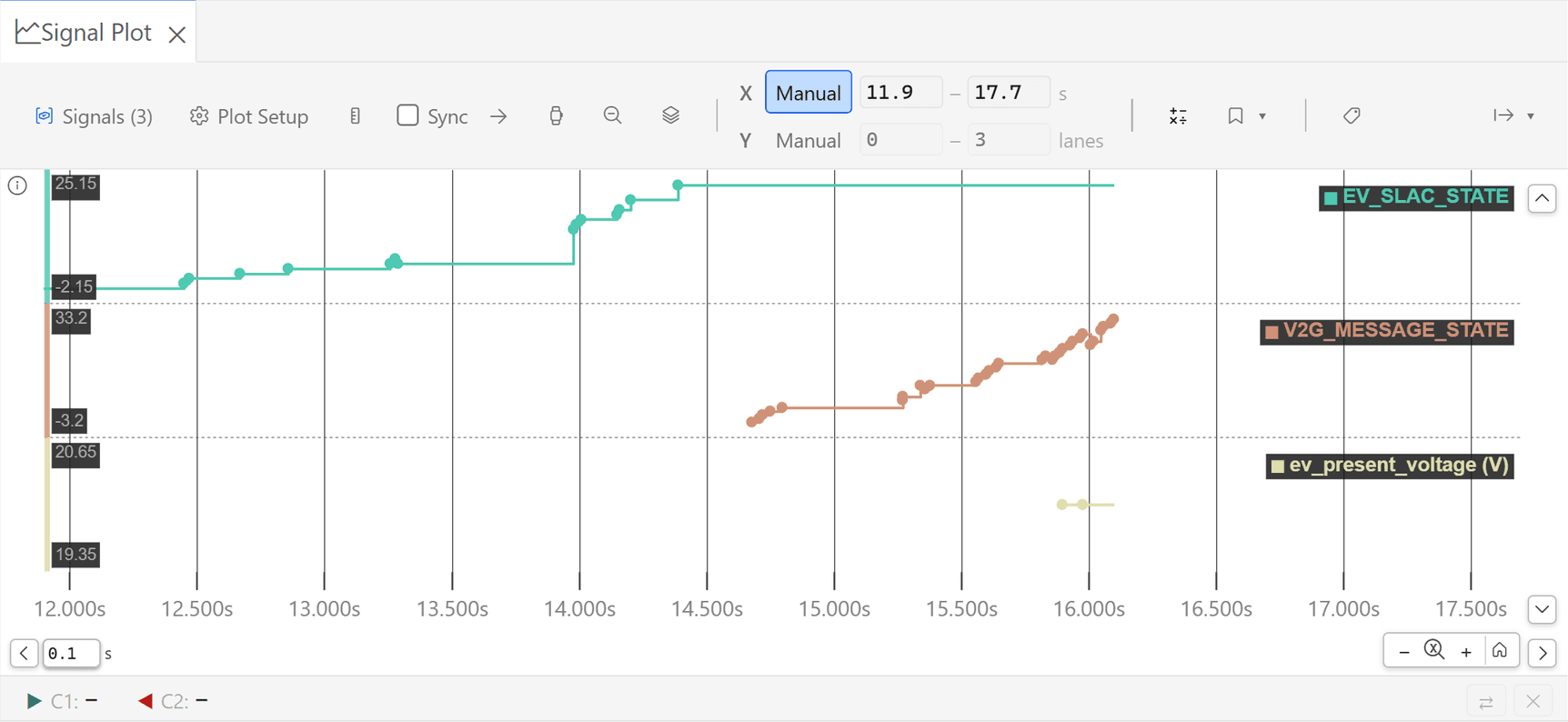
Plot the session over time
Every decoded V2G and SLAC value is available as a signal, together with the states the simulation publishes. The plot shows them on one time axis, for example the SLAC state, the V2G message state and the voltages of a DC session. Canonical V2G signals combine a field from all messages that carry it, so a value such as the present voltage is plotted without selecting individual messages.
- Signals from the trace and from the simulation in the same plot
- Two cursors for measuring the time between events
- Export of the plotted data and of the plot as an image
Automation
The simulated vehicle in tests and in CI.
The settings and states of the vehicle are environment variables of the simulation. Tests, the SDK, the command line and the uCAN Agent use them in the same way as the dashboard.
Python tests
A test sets the configuration of the vehicle, starts the session and checks the states and messages of the session. Tests run from the Test perspective with reports and the captured traffic.
Headless execution
Sessions and test suites run through the SDK and the command line in CI and nightly runs, without the GUI.
Supported by the uCAN Agent
The uCAN Agent configures the vehicle, starts sessions, and locates and explains messages in the trace.
Standards coverage
Supported standards.
| Scope | Status | |
|---|---|---|
| DIN SPEC 70121 | DC charging with external payment | supported |
| ISO 15118-2 | AC and DC, external payment and Plug & Charge, certificate installation and update | supported |
| ISO 15118-20 | AC and DC, bidirectional power transfer, scheduled and dynamic control | supported |
| ISO 15118-20 Amendment 1 | AC bidirectional power transfer with DER | supported |
| ISO 15118-3 | SLAC matching over HomePlug Green PHY on the vehicle side | supported |
| IEC 61851-1 | Control-pilot state and duty cycle on the vehicle side | supported |
| Transport security | TLS 1.2 and TLS 1.3, selectable per session, or no TLS | supported |
| Plug & Charge | Contract certificates and certificate installation with the PKI you provide | supported |
Part of the platform
Runs on UCAN Studio
The simulator is an add-on to UCAN Studio and uses the same workbench as network simulation, test automation and trace analysis. It is operated from the GUI, the SDK, the command line or the uCAN Agent, with the simulation, tests and traces in one project.
Demo · 30 minutes · online
Request a demo of the ISO 15118 EV Simulator
A 30-minute screen-share with an Alefbits engineer. We run a charging session with the vehicle configuration you name, DIN 70121, ISO 15118-2 or ISO 15118-20, with external payment or Plug & Charge, and show the dashboard and the decoded trace. Choose a slot in the calendar or send the form and we propose two.
Request a demoAfter the demo
Evaluation on your bench
If UCAN Studio fits, the next step is an evaluation on your bench: we agree the scope in a short call, then set up an evaluation environment for your hardware and standards, with a named engineer for questions.
Contact us