CHAdeMO Simulator
CHAdeMO charger simulator, scripted testing, signal plotting, and protocol message decoding for controller development.

A Software Charging Bench for CHAdeMO Controllers
UCAN Studio with the CHAdeMO Simulator add-on is a complete environment for developing and validating the vehicle-side charging-communication controller. It emulates the charger (SECC), while the electric vehicle node can be a virtual ECU model or a real hardware node — so you can exercise the full charging sequence in software, long before you book time on a physical charger.
CHAdeMO controllers must handle a large space of field configurations — protocol versions, connectors, extended features, and fault scenarios. Real chargers can reproduce the same scenarios, but doing so is complex, difficult, and time-consuming, and lab time is a scheduled, shared resource that regressions wait on. The simulator closes that gap, with a built-in library of CHAdeMO test cases authored by Alefbits and one unchanged test suite that runs from software (SIL) to the bench (HIL).
One Workbench for CHAdeMO Development
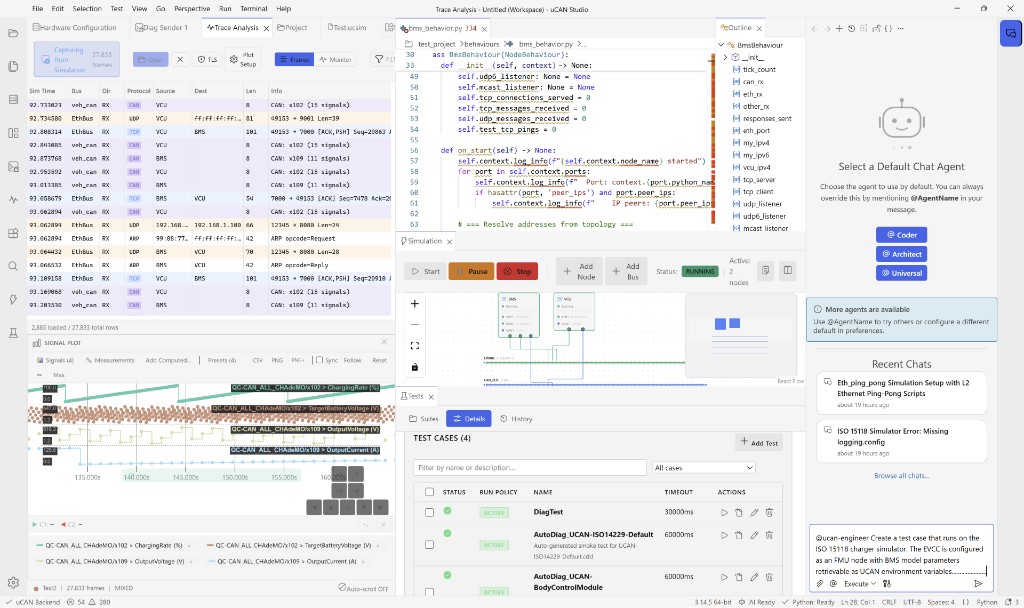
Built on UCAN Studio — one project model across simulation, test, trace, and hardware, driven from the GUI, the AI agent, or the SDK.
Protocol & Feature Coverage
- CHAdeMO 0.9, 1.1/1.2, 2.0.4, and 3.1 (ChaoJi)
- CHAdeMO and ChaoJi connectors
- DC charging
- CAN 2.0B @ 500 kbps
- Extended features such as dynamic and high-current control
- Manufacturer and vehicle-ID options
Key Features
- SECC co-simulation with the EV node as a virtual ECU (FMU) or real hardware
- Operator panel with EV and SE tabs, including battery and charger fault insertion
- Built-in CHAdeMO test cases, runnable as-is or extended with your own
- CAN trace decoding and signal plotting
- AI agent to generate, run, and analyze test cases
- Multi-vendor CAN hardware support (Vector, ETAS, Intrepid)
- Python SDK and CLI for headless execution in CI/CD pipelines
Development & Test Workflow
Drive the simulator by hand from the operator panel, then turn that session into a repeatable, automated test.
Operator Panel & Co-Simulation
Compose the bench visually — the EV, the charger (SECC), and the battery as nodes on a shared CHAdeMO CAN bus. Every control on the panel sets a node configuration, and every readout reflects live node state.
- EV tab and SE tab, each with session control, live state, and configuration windows
- Battery and charger fault insertion
- Link one node’s output to another’s input with no code
Built-in CHAdeMO Test Cases
The simulator ships with a curated library of CHAdeMO test cases authored by Alefbits from hands-on experience and a deep understanding of the CHAdeMO protocol — covering the charging sequence, version and connector handling, extended features, and fault and edge scenarios. Run them as-is or extend them with your own.
Automated Testing & Reporting
- Panel actions map one-to-one to Python test steps and assertions
- Reports in JUnit, HTML, and JSON formats
- Headless execution for CI pipelines
- Bus trace auto-captured alongside every run as attached evidence
From SIL to HIL
The same CHAdeMO test cases run across the full development V-model, so your work moves from the desk to the bench by switching the backend — not by rewriting tests.
Software
Validate the embedded charging-communication code fully in software — at every engineer’s desk, with no lab booking and no hardware.
Controller / ECU
Bind the bus to a real CAN channel and run the same charging-communication tests against the actual EVCC hardware — validating the controller’s CHAdeMO communication over supported Vector, ETAS, and Intrepid interfaces.
Full Charging System
Test the complete vehicle-side charging system. Alefbits provides engineering services for controlling third-party charging hardware — including power exchange and connector-switch control — so the simulator drives a real charging bench end to end.
Runs on UCAN Studio
The CHAdeMO Simulator is an add-on pack on the UCAN Studio platform — the same workbench you use for network simulation, test automation, and trace analysis, driven from the GUI, the SDK, or the AI agent.
Evaluate It Against Your Own Controller
Contact us for a live demo against your configuration of interest, a time-limited evaluation in your lab, or a defined pilot with Alefbits engineering support.
